
How do I get a skateboard in Rintama High?
Open your Phone (Tab on PC, phone icon on mobile) → tap Maps → use the skateboard / travel option inside the Maps layer. No Yen purchase or NPC quest in the current build.

How to get a skateboard in Rintama High: unlock it from the Phone, ride across Hokuheki City, and when Shift sprint beats the board for map travel.
Watch Phone Maps and skateboard travel across Hokuheki City before you ride yourself.
~11 min read
If you searched how to get skateboard in Rintama High, how to get a skateboard in Rintama High, or how to skate in Rintama High, you are almost always trying to solve the same problem: Hokuheki City is large enough that walking every Job route or campus-to-city trip burns real session time. Rintama High gives you a skateboard through your Phone for map travel, the same device that hosts the Maps overlay. Hold Shift when you need a quick burst on foot, hop on the board for longer open-street runs, and pull up Maps before you commit to a direction. Verified August 9, 2026.
| Fact | Detail |
|---|---|
| Where you get it | Phone → Maps app → skateboard / travel option inside the map layer |
| Best use case | Long open-street runs across Hokuheki City |
| On-foot alternative | Hold Shift to sprint — faster than walking, slower than the board over distance |
| Navigation pairing | Phone > Maps overlay to see position before you ride |
| Not required for | Training Grounds — that experience loads separately from the main map |
You do not buy a skateboard from an NPC, redeem it from a code, or unlock it through a Job. In the current build, the skateboard comes from your Phone as a travel tool tied to map navigation — the same Phone you use for Settings, character customization, and the Maps overlay described on the locations page.
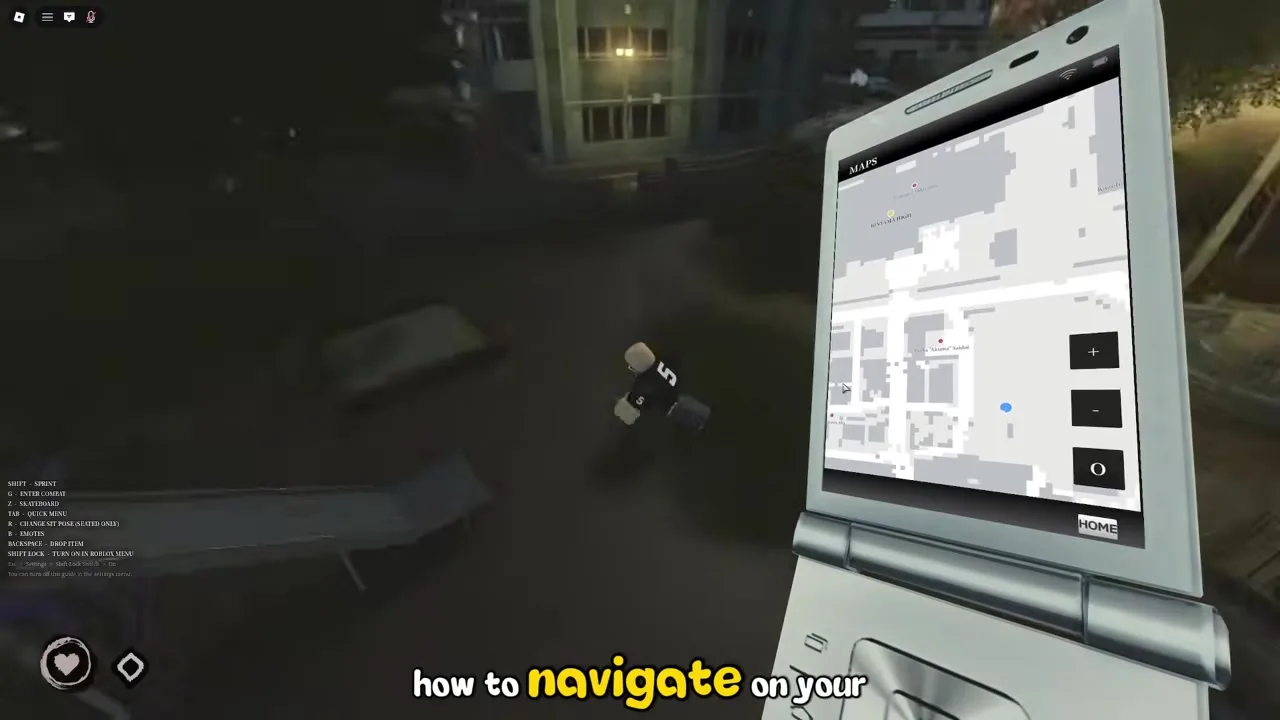
Rintama High treats fast travel as a utility layered onto the map rather than a progression gate. Fighting Styles cost Yen and require finding Kamasaki Yuri on foot, but the skateboard sits next to the Maps app because the developers expect you to cross Hokuheki City regularly for Jobs, Konbini stops, and Roleplay meetups. That design choice matches what early players report: the friction is learning the menu path once, not grinding currency for a vehicle.
If you are brand new and have not opened the Phone at all yet, run through the beginner guide character and Settings steps first so Tab (or the mobile phone icon) feels natural before you worry about boards.
The Phone layout is the same on PC and mobile once it is open — only the open input differs. PC players hold Tab; mobile players tap the corner phone icon. After that, the Maps layer and skateboard travel option sit in the same place, which means a route you learn on one device transfers to the other without re-mapping controls.
Unlike hair or outfit Asset IDs you paste from the Roblox Marketplace, the skateboard is an in-experience travel tool. You will not find a skateboard catalog on roblox.com, and redeeming codes does not grant one. If a third-party list promises a "skateboard code," treat it as mislabeled — codes on this wiki only cover Yen and Reroll Tokens until in-game confirmation says otherwise.
Once the skateboard is out, how to skate in Rintama High mostly means riding it across open ground in Hokuheki City rather than threading tight indoor spaces. The board is built for street-scale distance, not rooftop parkour or classroom chases.

| Step | What to do |
|---|---|
| 1 | Open Maps from the Phone if you have not already — note your destination relative to campus |
| 2 | Equip the skateboard from the Phone travel layer and close the menu |
| 3 | Move onto open pavement or street sections with clearance in front of you |
| 4 | Ride toward your waypoint — the Konbini, a Job NPC, or a bridge landmark |
| 5 | Dismount before tight corridors, stairs, or crowded Roleplay scenes where the hitbox gets awkward |
Hokuheki City's main walkable streets and the roads connecting campus to the city fringe are where the skateboard pays off. Campus interiors — classrooms, narrow corridors, the rooftop access paths — are usually faster on foot with a short Shift sprint than trying to force the board through corners. Think of the skateboard as your highway and walking as your last-mile tool.
Toggle Passive Mode from Phone → Settings when you only want to explore or commute to a Job without combat pulling you in. The skateboard works the same either way — Passive Mode gates fighting, not movement — which makes board travel a safe default while you are still learning where NPCs actually hand out work. See Yen farming for what to do once you arrive.
Shift is your on-foot sprint — use it for short campus hops and after you dismount. Equip the skateboard from Phone → Maps first; the beginner guide ties Shift to travel because many routes chain a sprint after the board, not because Shift replaces the Maps equip step. You do not need shift lock enabled just to ride; shift lock matters for combat once Passive Mode is off.
Matched by build plan, shared topics, and guide progression — not random related links.
Rintama High gives you two speed layers on the main map: hold Shift to sprint on foot, or ride the skateboard from your Phone. Neither replaces the Maps overlay — they solve different distances.
| Method | Speed | Best for |
|---|---|---|
| Walking (default) | Slowest | Indoor RP, tight campus halls, standing conversations |
| Shift sprint | Faster than walking; slower than the board over long distances | Short gaps, last-mile after you dismount, chasing someone across the schoolyard |
| Skateboard | Fastest sustained travel on open streets | Campus gate to Konbini, cross-city Job routes, reaching far Hokuheki City landmarks |
| Maps + skateboard | Same board speed, fewer wrong turns | Any trip where you have not memorized the city layout yet |
If your destination is one building away on campus, spawning the board costs more time than holding Shift for ten seconds. Sprinting also wins when you need to stop and talk to an NPC immediately — dismounting, remounting, and reopening the Phone adds menu friction that sprinting avoids. Use Shift as the default inside the school and pull the board only when you can see open street ahead.
Hokuheki City is large enough that walking the full distance from Rintama High's front gate to the far side of the exploration layer wastes real session time — exactly why the locations page pairs the Maps app with a skateboard callout. Any route that crosses multiple street blocks, bridges, or open plazas should start on the board. Job grinding in particular benefits: several NPCs sit far enough apart that sprinting between them still feels sluggish once you know where they are.
Neither Shift sprint nor the skateboard costs Yen per use in the current build, so the real limit is attention, not currency. Sprinting is mentally lighter for micro-distances; the board is mentally lighter for macro-distances because you maintain speed without holding an input the entire way. Switch between them instead of treating one as "correct" — most efficient players Maps first, board across the city, sprint the last corridor.
Hokuheki City wraps around the Rintama High campus as one continuous map — not a separate loading screen. The skateboard, Shift sprint, and Phone Maps app are the three tools that make that scale manageable once Roleplay scenes stop pinning you to a single classroom.
Start from a familiar landmark — the front gate, the schoolyard, or a corridor exit you use for meetups — and open Maps before you cross into the wider streets. Ride the skateboard along the main connectors until the overlay shows you nearing the Konbini, a bridge, or a Job NPC ping you care about. The Konbini is the usual first city stop because it spends Yen on small items between shifts; see locations for how it sits relative to campus.
Jobs come from NPCs scattered across campus and Hokuheki City, not from a Phone menu list. That means your commute is part of the grind: board to the first NPC, finish the shift, board to the next candidate instead of sprinting block after block. If you are farming Yen for a Fighting Style, pairing skateboard travel with the Yen farming loop saves more time than optimizing combat alone.
Training Grounds is a separate public Roblox experience for combat practice — you load it from its own page, not by riding farther into Hokuheki City. The skateboard also does not teleport you; it only speeds up travel on the main map. If someone tells you to "ride to Training Grounds," they mean leave the main map entirely, not push the board to a hidden portal.
Most skateboard problems are menu-state issues, not missing unlocks. Work through the table before assuming the feature was removed in a patch.
| Problem | Likely cause | Fix |
|---|---|---|
| No skateboard option in Phone | Phone opened from a stale HUD state after joining | Close the Phone fully, reopen with Tab or the mobile icon, then check Maps/travel again |
| Board spawns but character will not move | Tight geometry or indoor collision | Back out to open street or campus yard; dismount and Shift sprint through narrow halls |
| Skateboard feels slower than sprinting | Short distance or uphill path not suited to the board | Use Shift for micro-trips; reserve the board for multi-block Hokuheki routes |
| Maps overlay missing | Opened Settings or Customize Character instead of Maps | Back out to Phone home → tap Maps → use the travel / skateboard option inside |
| Still getting pulled into fights while commuting | Passive Mode left off | Toggle Passive Mode on from Phone → Settings until you want combat |
| Expected a code or shop unlock | Misinformation — board is a Phone travel tool | Follow the get section above; spend Yen on Fighting Styles instead |
Rintama High is a new release, and menu order can shift between patches the same way the codes field occasionally moves in Settings. If Maps or travel options look different from your last session, back out to the Phone home screen and reopen rather than assuming the skateboard was removed — a stale menu layer after an update is a common Roblox pattern.
Roleplay scenes that depend on pacing — slow delinquent walks, corridor confrontations, rooftop hangs — often look wrong if you arrive on a board at full speed. Dismount a block early and walk in. The skateboard is for getting to the scene on time, not performing the scene itself.
Open your Phone (Tab on PC, phone icon on mobile) → tap Maps → use the skateboard / travel option inside the Maps layer. No Yen purchase or NPC quest in the current build.
Same path as PC once the Phone is open: tap the phone icon → Maps → spawn the board from the travel option inside Maps.
Ride across open Hokuheki City streets and campus-adjacent roads; dismount for tight indoor spaces. Pair with the Maps overlay so you are riding toward a landmark, not guessing.
Yes over long distances on open ground. Shift sprint wins for short campus hops.
Not in the current build — it is a Phone travel utility, unlike Fighting Styles purchases.
No — combat uses the standard kit with Passive Mode off. The board is for navigation only.
No — codes grant Yen and Reroll Tokens. The board comes from the Phone travel layer.
From campus toward Hokuheki City landmarks — Konbini, bridges, Job NPCs — using locations as your anchor list.
August 9, 2026
Once skateboard travel feels automatic, spend the time you saved on the systems that actually gate progression — map knowledge, first-session habits, and Yen income.
Locations names the campus and Hokuheki City anchors worth riding toward. The beginner guide covers Phone basics, Passive Mode, and Shift controls that sit underneath board travel. Yen farming turns fast commutes into shorter Job loops so your Fighting Style purchase arrives sooner — the whole point of fixing travel in the first place.
Matched by build plan, shared topics, and guide progression — not random related links.