
Where exactly do I redeem Rintama High codes?
Phone menu > Settings > paste code into the entry field > confirm.

How to redeem Rintama High codes: open the Phone, go to Settings, paste the code, then confirm. Fixes for invalid, expired, and already-redeemed errors.
Watch the exact Phone > Settings path used to redeem a code.
~5 min read
Players searching Rintama High redeem codes already have a string copied and just need the exact menu path — this page is that claim path, not another code list. Pair it with the active codes list. As of August 9, 2026, ILOVECAMERAS reports 5 Reroll Tokens. Verified August 9, 2026.
| Fact | Detail |
|---|---|
| Redeem location | Phone menu > Settings |
| Open phone | Tab (PC) or the phone icon (mobile) |
| Limit | One redeem per code per Roblox account |
| Typical reward | Yen and/or Reroll Tokens |
| Full code list | Rintama High codes |
Follow these steps in order — the redeem field is buried a couple of taps into the phone, not on the main HUD.
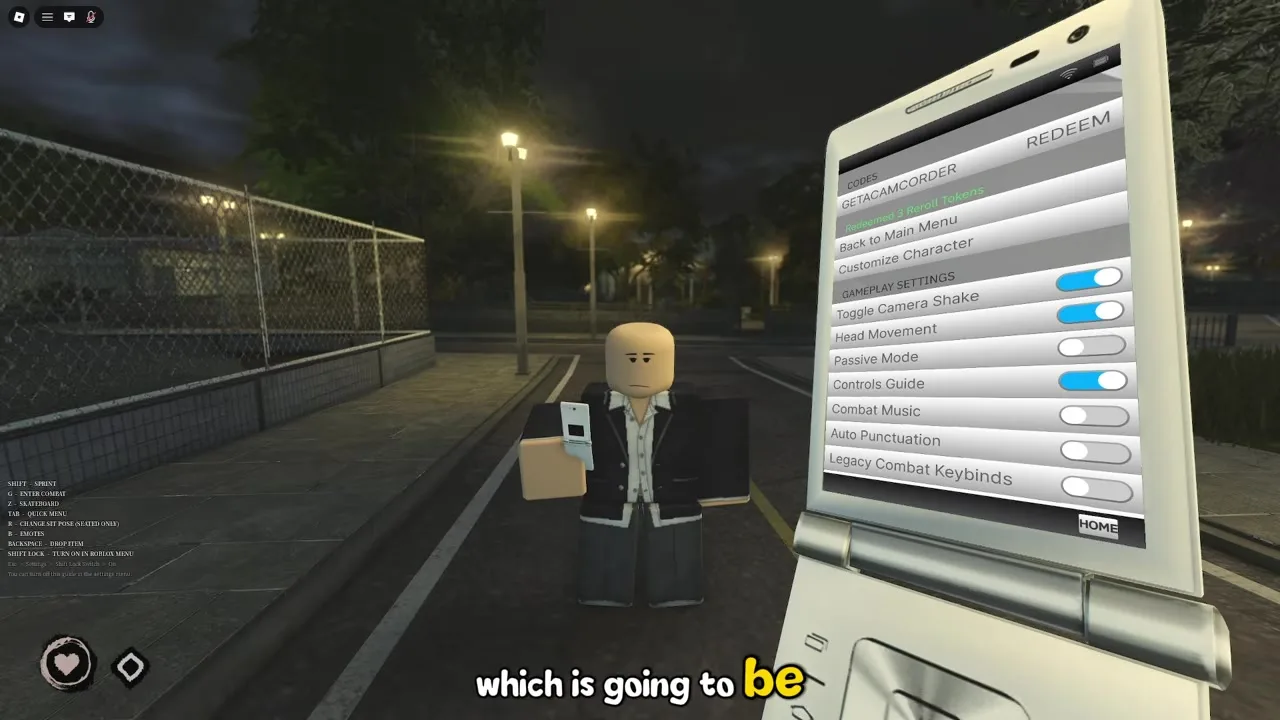
| Step | Action |
|---|---|
| 1 | Launch Rintama High on Roblox and load into a session |
| 2 | Open the Phone from your character HUD — hold Tab on PC |
| 3 | Go to Settings inside the Phone menu |
| 4 | Copy an active code and paste it exactly into the code field |
| 5 | Confirm redeem and watch for a success message before backing out |
Every extra keystroke is a chance to add a trailing space or swap a lowercase letter for uppercase, and Rintama High treats the redeem string as case-sensitive. Copying from the codes list and pasting removes that risk entirely.
A successful redeem shows a short confirmation message on screen and the field clears itself. If Yen was part of the reward, check your balance from the Phone home screen right after — it updates immediately, so there is no reason to wait or rejoin before spending it.
A handful of causes cover almost every failed attempt. Work down this table before assuming the code itself is broken.
| Symptom | Likely cause | Fix |
|---|---|---|
| Invalid code instantly | Typo or wrong case from manual entry | Re-copy from the codes list instead of retyping |
| Already redeemed | One-time claim already used on this account | Move to the next active code on the list |
| Nothing happens on confirm | Stale client after a patch went live mid-session | Rejoin the experience, then try the redeem again |
| Menu does not show a code field | Looking in the wrong tab of the Phone | Open Settings specifically, not the home screen or map tab |
| Code worked on a stream or video but not for you | That string already expired between recording and posting | Check the current active codes table for what actually still works |
Rintama High is a brand-new release, so a live update can move a menu around between sessions without warning. If Settings does not show a code field where you last saw it, back all the way out to the Phone home screen and reopen Settings rather than assuming the feature was removed — a stale menu state after a patch is a common cause.
There is no bulk-redeem box — each code goes through the same Settings field, one at a time.
Run through every active code before you commit Yen to a Fighting Style purchase — a fresh code can hand you enough Yen to afford a better option than you were about to buy with your Job earnings alone.
The Settings redeem field is identical on mobile and PC — the only difference is how you open the Phone. PC players hold Tab, mobile players tap the phone icon in the corner of the HUD. Once the Phone is open, Settings and the code field sit in the same place on both.
Free Yen and Reroll Tokens are only useful once you spend them somewhere that moves your account forward, so treat a successful redeem as a to-do, not the finish line.
Phone menu > Settings > paste code into the entry field > confirm.
Yes — copy from the codes list instead of retyping to avoid a rejected string.
No — one claim per code per Roblox account, even across different characters.
It likely expired between when they redeemed it and now, or it belongs to a different game entirely — check the current active list rather than an old video or post.
Ask in the official Discord — other players there can confirm whether a code is still live server-side.
Head to Yen farming to cover the rest of your first Fighting Style purchase.
Yes — only the way you open the Phone differs. The Settings tab and code field are identical once it is open.
No. A successful redeem applies immediately and shows in your Yen balance without a rejoin.
Matched by build plan, shared topics, and guide progression — not random related links.